
Microsoft Copilot stores every prompt and every response in a hidden folder in the Exchange mailbox of the person who asks. For retention and eDiscovery that is convenient. For everyone who has access to that mailbox, or receives it when someone leaves, it opens a store that hardly any permission review knows about. We think this is the wrong place and say what you can do while Microsoft keeps it.
A managing director asks Copilot on Monday morning how to announce the restructuring of the sales team, which notice periods apply and which questions the board will raise. Her office manager has had full access to her mailbox for years to look after meetings and email. The questions to Copilot now sit in that same mailbox. Outlook does not show them to the office manager. Who can reach them anyway depends on roles and tools nobody thought about when the full access was granted.
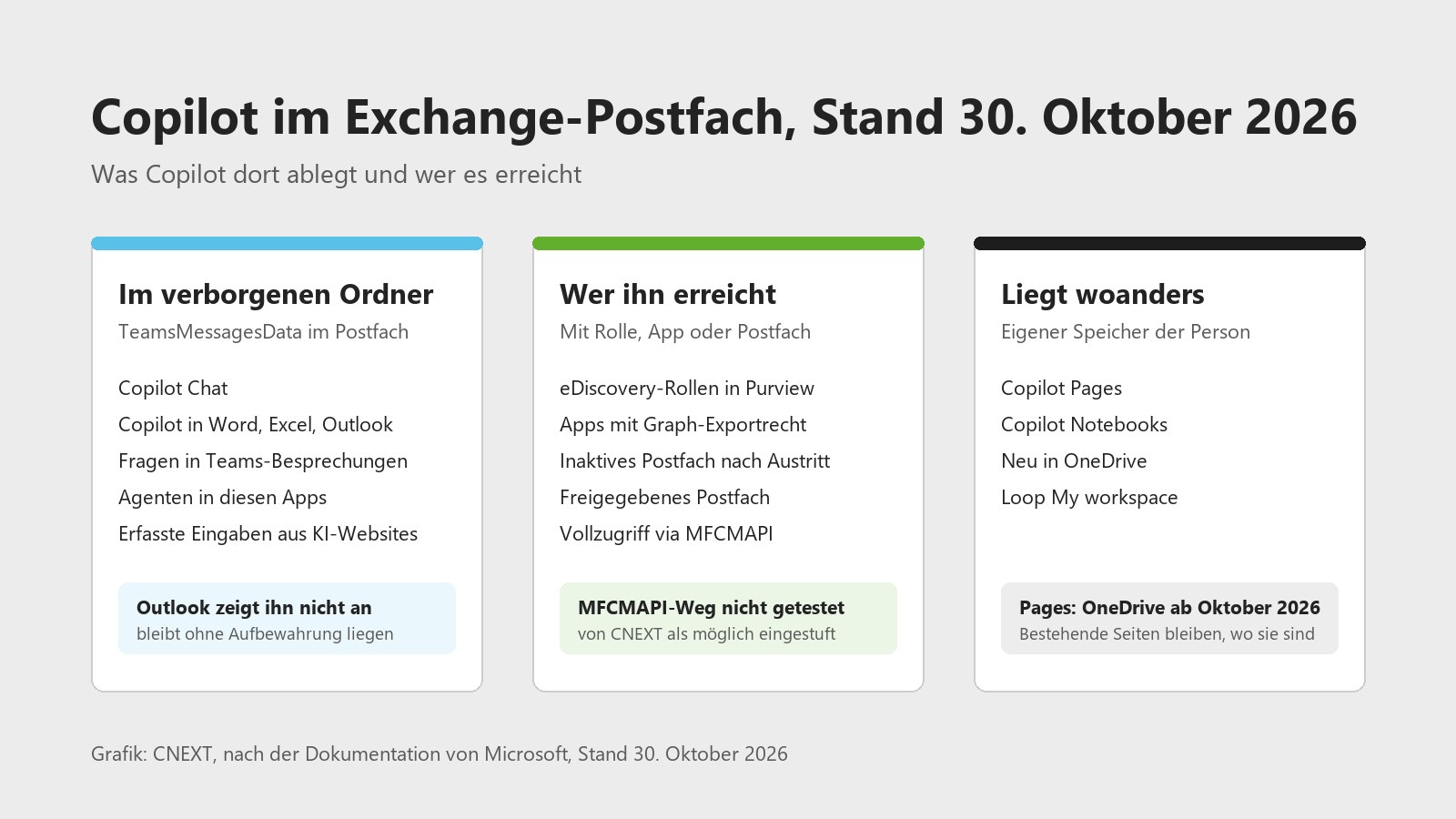
Graphic: CNEXT, after Microsoft's documentation, as of 30 October 2026.
What sits in the mailbox?
Microsoft states it plainly in the Purview documentation: data from generative AI messages is stored in a hidden folder in the mailbox of the user who runs the AI app. According to Microsoft the folder is meant for eDiscovery searches; users and administrators are not meant to open it directly.
This covers prompts, responses and cited sources from Copilot Chat, from Copilot in Word, Excel, PowerPoint, Outlook, OneNote, Loop and Whiteboard, and from questions to Copilot in Teams meetings. Agents inherit this behaviour from the app they run in, and Security Copilot, Copilot in Fabric and Copilot Studio write there too. Turn on a Purview collection policy that captures content and prompts from ChatGPT Enterprise, Foundry apps and AI websites such as ChatGPT or Gemini land in the same folder. Specialists know it as TeamsMessagesData, where Teams has kept compliance copies of chats for years.
Copilot Pages and Notebooks live elsewhere: in a user-owned SharePoint Embedded container and, since Microsoft started switching over in mid-October 2026, in the user's OneDrive for new pages.
Without a retention policy the history stays. When someone closes the chat window, Copilot only hides the messages. They are gone once the person deletes the chat or their whole history in the My Account portal. If a retention policy or a hold applies, Exchange keeps a copy in SubstrateHolds, another hidden folder, until the period ends.
Why did Microsoft choose the mailbox?
In Microsoft 365 the mailbox is the ready-made compliance boundary. Retention, Litigation Hold, eDiscovery, data residency and inactive mailboxes after someone leaves have worked there for years, and Teams uses the same pattern for chats. Microsoft writes that Exchange mailboxes store the copies behind the scenes, in the same mailbox type that holds messages from Teams private channels. Anyone who had to make Copilot auditable for banks, hospitals and governments in a short time found everything ready here.
We understand the decision. It was the convenient path, and for Copilot it fits badly.
Why do we think it is wrong?
The mailbox is the most widely shared object in Microsoft 365. Office managers get full access, teams share mailboxes, and when someone leaves, the mailbox is often converted to a shared mailbox and assigned to their successor. All these grants were decided for email. With Copilot, the same container now holds something else: a question shows what someone intends before they write to anyone. Whoever asks about notice periods, a diagnosis or how to rate a colleague leaves a trail that never existed in email.
Microsoft has closed the obvious routes. Outlook does not show the folder, and since June 2026 the Graph mail API refuses access to hidden folders of this kind. These routes remain open:
- eDiscovery: whoever holds the right Purview role searches any mailbox with the condition "Copilot activity" and exports the results.
- Graph export: an app with the AiEnterpriseInteraction.Read.All permission reads the Copilot interactions of every person in the tenant once an administrator consents.
- Leavers: when the account is deleted, the interactions stay in an inactive mailbox while retention applies, and eDiscovery still finds them. When the mailbox is converted to a shared mailbox, the hidden folder stays in it as far as we can tell, because it is still the same mailbox.
So "hidden" means mail clients do not display the folder. The permission on the mailbox applies to it all the same.
In Switzerland, employment law adds a constraint. Prompts in Copilot are personal data of employees, and Art. 328b of the Swiss Code of Obligations allows the employer to process such data only where it concerns suitability for the job or is needed to perform the employment contract. If you pass Copilot history on with the mailbox when someone leaves, clear it with your data protection officer first.
What can you do now?
- Review full access. List all full access grants on mailboxes, for example with Get-MailboxPermission, and ask for each one whether it should cover Copilot history. For management and HR, delegate access to calendar and inbox is often enough.
- Rework the leaver process. Give the successor the email and folders they need and exclude Copilot activity from the export. The mailbox itself stays with compliance as an inactive mailbox, where only eDiscovery roles reach it.
- Set a separate period for Copilot. Microsoft has separated Copilot interactions from Teams chats in retention policies. Decide how long you really need the history and delete it afterwards.
- Keep eDiscovery and Graph rights narrow. Assign eDiscovery roles through Privileged Identity Management for a limited time, monitor exports in the audit log, and check which apps hold AiEnterpriseInteraction.Read.All.
- Turn on collection policies deliberately. DSPM for AI shows which data ends up in prompts. Every policy that captures content also puts prompts from ChatGPT or Gemini into the mailbox. Capture content where you need it for investigations.
- Apply labels and tell people. Sensitivity labels with encryption keep documents out of responses when the extract right is missing. Tell your staff that Copilot history is a business record that can be searched in an investigation.
What we expect from Microsoft
A dedicated store for AI history, with retention and eDiscovery as today and an access model that does not inherit mailbox permissions. Microsoft shows that it can be done: Copilot Pages and Notebooks live in a container of their own. Until then, a setting that separates Copilot history when a mailbox is converted to a shared mailbox would help.
Availability in Switzerland
As of 30 October 2026, checked against Microsoft's documentation.
| Capability | Status according to Microsoft | In Switzerland |
|---|---|---|
| Storage location of Copilot interactions | In the mailbox, at rest in the tenant's default geography; Copilot has been part of the data residency commitments since 1 March 2024 | Yes, for tenants with Switzerland as default geography |
| Processing of prompts | Within the EU Data Boundary, which includes the EFTA; in-country processing announced for 2026 | Within the EU Data Boundary; processing in Switzerland not confirmed |
| Separate retention policy for Copilot interactions | Available in Purview | Yes |
| eDiscovery with the condition "Copilot activity" | Available in Purview | Yes |
| DSPM for AI | Available in Purview | Yes |
| Graph export of Copilot interactions | Available in Graph v1.0, requires a Microsoft Copilot licence | Yes |
| New Copilot Pages and Notebooks in OneDrive | Rolling out from mid-October to late November 2026 | Yes, with the worldwide rollout |
Limits
We have not tested whether someone with full access can read the records with MFCMAPI. Full access lets you open the mailbox in an Outlook profile, and MFCMAPI shows hidden folders in such profiles; Tony Redmond read Teams records in the same folder this way. We treat the route as possible until Microsoft documents otherwise.
That the folder survives the conversion to a shared mailbox is our inference from it being the same mailbox; Microsoft does not document it explicitly. Agents built in Copilot Studio have their own location in retention policies, and the Graph export does not return their interactions. Microsoft changes these details often; we will update this article when something moves.
Next step
Who can reach the Copilot history of your management today? We review full access grants, the leaver process, retention and eDiscovery roles with you and record what you should change. How we set up AI governance is described on our AI governance page. I look forward to the conversation.
Marcel Haas, CEO CNEXT
Sources: Microsoft Learn, Learn about retention for Copilot and AI apps, as of 23 September 2025. Microsoft Learn, Microsoft Purview data security and compliance protections for generative AI apps, as of 27 May 2026. Microsoft Learn, Data, Privacy, and Security for Microsoft Copilot, as of 9 July 2026. Microsoft Learn, aiInteractionHistory: getAllEnterpriseInteractions, as of 23 February 2026. Microsoft Learn, Governance and compliance for Copilot Pages and Copilot Notebooks, as of 6 July 2026. Message Center MC1449182, Copilot Pages and Notebooks Creation in OneDrive, updated 8 October 2026. Microsoft Learn, Data Residency for Microsoft Copilot, as of 8 October 2026. Tony Redmond, Microsoft Blocks Graph Access to Non-IPM Folders, 18 June 2026, and Using the MFCMAPI Utility to See Inside Exchange Online Mailboxes, 27 October 2023. All facts checked on 30 October 2026. Related: Rolling out Microsoft Copilot in Switzerland.