

As the CEO of a technology company, I face the daily challenge of making strategic decisions, overseeing projects, maintaining customer relationships, and ensuring operational excellence at the same time. In this article, I share my experiences of developing a Virtual Copilot with Microsoft Copilot Studio and a well-thought-out data ecosystem to assist me with my daily CEO tasks.
The Vision: A Digital CEO Assistant
The idea came from the realization that a large part of my daily work consists of recurring information queries, status updates, and coordination tasks. Why not develop an AI agent that automates these tasks and proactively provides me with relevant insights?
The Data Ecosystem: The Foundation for Intelligent Decisions
System Architecture Overview
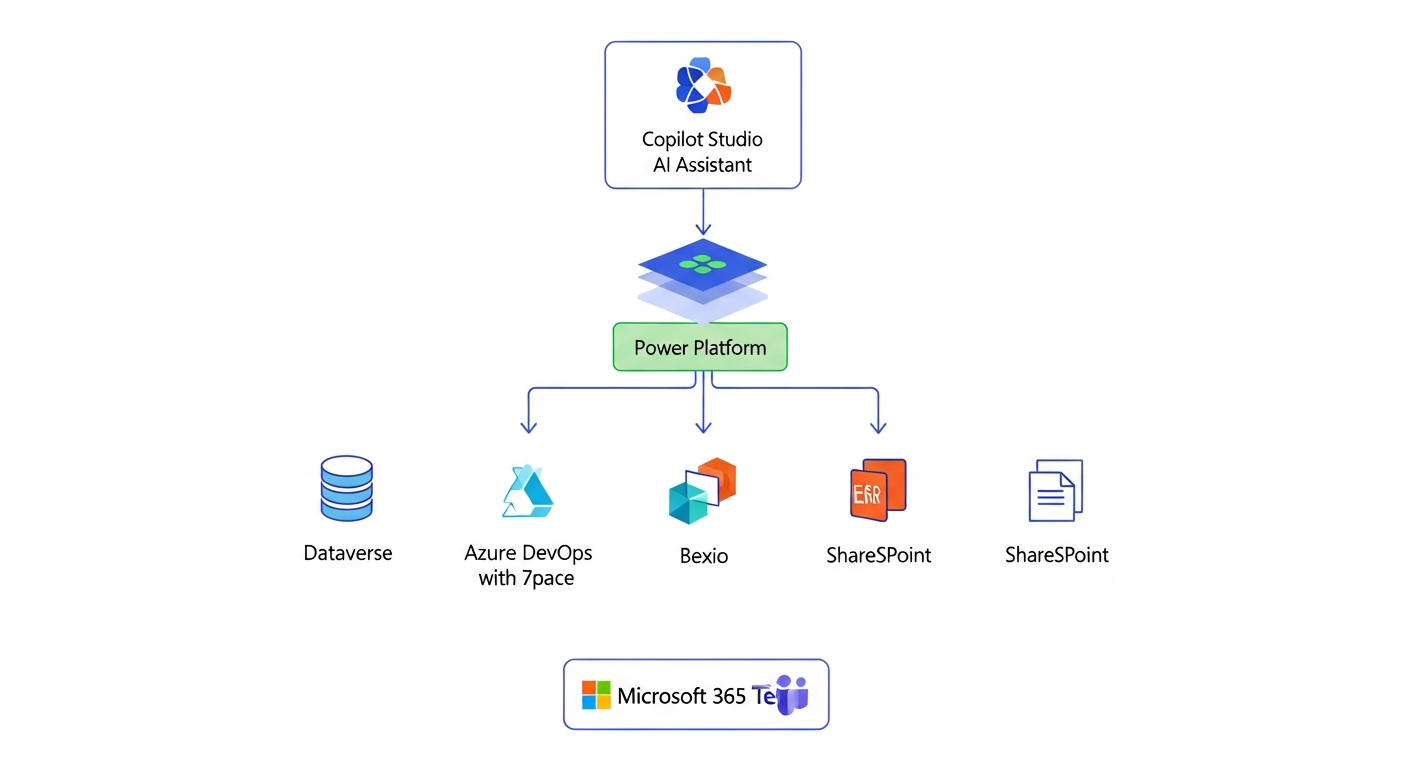
┌─────────────────────────────────────────────────────────────────────────────┐
│                           COPILOT STUDIO                                     │
│                        (Virtual CEO Assistant)                               │
│  ┌─────────────┐  ┌─────────────┐  ┌─────────────┐  ┌─────────────┐         │
│  │   Daily     │  │ Interactive │  │  Proactive  │  │   Action    │         │
│  │  Briefings  │  │   Queries   │  │   Alerts    │  │  Triggers   │         │
│  └──────┬──────┘  └──────┬──────┘  └──────┬──────┘  └──────┬──────┘         │
└─────────┼────────────────┼────────────────┼────────────────┼────────────────┘
          │                │                │                │
          └────────────────┴────────────────┴────────────────┘
                                    │
                    ┌───────────────┴───────────────┐
                    │      POWER PLATFORM           │
                    │   (Connectors & Dataflows)    │
                    └───────────────┬───────────────┘
                                    │
        ┌───────────────┬───────────┴───────────┬───────────────┐
        │               │                       │               │
        ▼               ▼                       ▼               ▼
┌───────────────┐ ┌───────────────┐     ┌───────────────┐ ┌───────────────┐
│   DATAVERSE   │ │  AZURE DEVOPS │     │  BEXIO ERP    │ │  SHAREPOINT   │
│               │ │    + 7PACE    │     │               │ │               │
├───────────────┤ ├───────────────┤     ├───────────────┤ ├───────────────┤
│ • WorkItems   │ │ • Work Items  │     │ • Finances    │ │ • Inbox       │
│ • Sales       │ │ • Sprints     │     │ • Invoices    │ │ • Contracts   │
│ • Accounts    │ │ • Time Track  │     │ • Contacts    │ │ • Documents   │
│ • Contacts    │ │ • Burndown    │     │ • Orders      │ │ • Projects    │
│ • Billing     │ │ • Repos       │     │               │ │               │
│ • Projects    │ │               │     │               │ │               │
└───────────────┘ └───────────────┘     └───────────────┘ └───────────────┘
        │               │                       │               │
        └───────────────┴───────────┬───────────┴───────────────┘
                                    │
                    ┌───────────────┴───────────────┐
                    │     MICROSOFT 365 / TEAMS     │
                    │    (User Interface Layer)     │
                    └───────────────────────────────┘
Dataverse as the Central Data Platform
The core of our solution is Microsoft Dataverse. Here, we store all business-critical data:
- WorkItems: All work tasks and their statuses
- Sales Pipeline: Opportunities, deals, and forecasts
- Accounts & Contacts: Complete customer information
- Billing & Planning: Invoicing and resource planning
- Projects: Project data with milestones and progress
Azure DevOps for Project Management
For detailed project management, we use Azure DevOps, integrated with 7pace for time tracking:
- Work Item Tracking: Detailed task tracking
- Sprint Planning: Agile project planning
- Time Tracking with 7pace: Precise time tracking per project and customer
- Burndown Charts: Visualization of project progress
Bexio ERP as the Backend System
Our ERP system Bexio serves as the source of truth for:
- Financial Data: Accounting and financial reporting
- Invoicing: Automated billing
- Contacts: Synchronization with Dataverse
- Order Management: From quotes to invoices
SharePoint for Document Management
The inbox and all documents are managed in SharePoint:
- Incoming Mail: Digitized business correspondence
- Contracts: Central storage with metadata
- Project Documentation: Structured project folders
Copilot Studio: The Intelligent Assistant
With Microsoft Copilot Studio, we developed a custom agent that can access all these data sources:
Daily Briefings
Every morning, I automatically receive:
- Overview of open deals and their development
- Critical project milestones for the week
- Outstanding invoices and incoming payments
- Important appointments and customer interactions
Interactive Queries
I can ask natural language questions such as:
- "What is the status of project XY?"
- "Which deals are in the closing phase this week?"
- "How many hours were logged on project Z last week?"
- "Show me the outstanding invoices over CHF 10,000"
Proactive Notifications
The agent automatically informs me about:
- Project delays or budget overruns
- Significant changes in the sales pipeline
- Overdue payments or critical cash flow situations
Optimizing Core Processes
Automating Time Tracking
The integration of Azure DevOps with 7pace revolutionizes our time tracking:
- Automatic Suggestions: Based on completed work items, the agent suggests time entries
- Weekly Overview: "Show me my logged hours this week per project"
- Identifying Missing Entries: The agent proactively notifies when team members have open entries
- Project Evaluations: Instant analysis of logged vs. planned hours per project
- Customer Billing: Automatic compilation of billable hours for invoicing
Optimizing Internal Communication
The Virtual Copilot improves internal team communication:
- Generating Status Updates: Automatic summaries of project progress for team meetings
- Meeting Preparation: Relevant data and metrics for upcoming discussions
- Knowledge Transfer: Quick access to project documentation and historical decisions
- Team Coordination: Overview of capacities and availabilities
- Escalation Management: Automatic notifications for critical issues
Professionalizing External Communication
Customer communication is also supported by the agent:
- Customer Briefings: Summary of all relevant customer information before meetings
- Project Reports: Automatically generated status reports for customers
- Proposal Preparation: Historical data and reference projects for new offers
- Follow-up Reminders: Reminders for pending customer responses
- Post-Inbox Management: Query incoming correspondence from SharePoint directly in the chat
Transforming My Workday
Since introducing my Virtual Copilot, my way of working has fundamentally changed:
Time Savings
- 2-3 hours daily less spent searching for information
- Instant answers instead of manual reports
- Focus on strategic tasks instead of operational details
Better Decisions
- Real-time data for informed decisions
- Holistic view across all business areas
- Early detection of risks and opportunities
Conclusion
The combination of Copilot Studio, Dataverse, DevOps with 7pace, Bexio, and SharePoint has enabled me to develop a Virtual CEO Assistant that not only reacts to questions but proactively contributes to the success of the company. The investment in this infrastructure pays off multiple times over through increased productivity and better decision-making quality.
In the coming weeks, I will delve deeper into the technical implementation in further articles and show how you can develop such an agent for your company.